
CSV files, Excel files, exported Oracle EPM grids, Smart View-style workbooks, saved validation configs, and data readiness artifacts.
Smart View grid validation
Validate Smart View-style grids with drillable evidence.
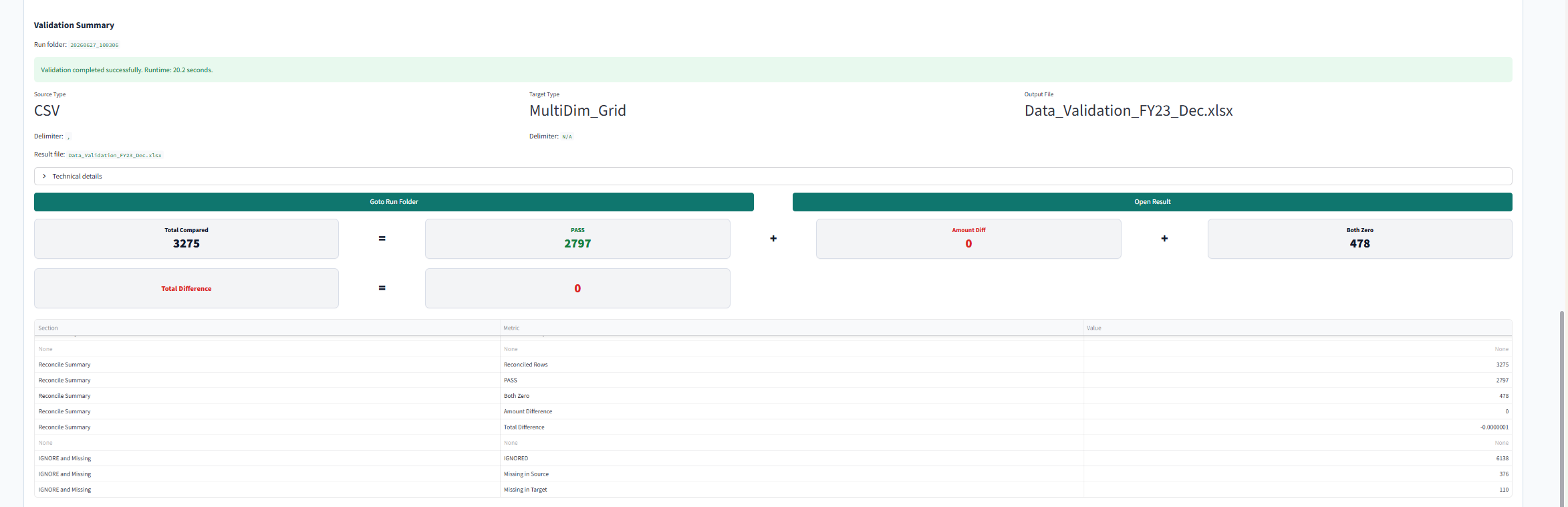
EPM Vitals compares source files with Excel or Smart View-style target grids, then keeps source-to-target evidence reviewable instead of hidden in one-off spreadsheet checks.
Related EPM search paths
Search terms tied to Excel-based EPM validation, source-to-target checks, and review evidence.
- #SmartView
- #ExcelGridValidation
- #EPMDataValidation
- #DataLoadValidation
- #CSVReconciliation
- #GridValidation
- #DrillBackEvidence
- #OraclePlanning
- #FCCS
- #PBCS
Platform review path
Where this fits for Smart View and Oracle EPM teams.
Use this path when a saved workbook, exported grid, or source file needs to become a repeatable validation record for implementation, release, or support review.
Does the source file match the target grid, where are the differences, and can reviewers trace the result back to both sides?
Source-to-target comparison results, drillable Excel evidence, difference summaries, readiness findings, and reusable validation workbooks.
EPM Vitals reviews exported files and grids; it does not replace Smart View, Oracle EPM, or the existing data load process.
Manual validation pressure
Why Smart View-style grids are hard to validate manually.
Many EPM teams still validate Smart View-style Excel grids by checking workbook tabs, source extracts, trial balance totals, variance notes, and email explanations by hand. That may work for one urgent review, but it is hard to repeat, hard to hand over, and hard to defend when someone asks where a number came from.
One workbook becomes the memory of the review.
Reviewers compare tabs, copied values, manual checks, and comments. The decision may be right, but the evidence is often trapped in a private Excel path that the next reviewer has to reconstruct.
Totals do not explain the source row behind a variance.
A variance review needs source rows, target grid cells, dimensions, and mapping context. Without drill-back, teams can agree on the total while still disagreeing about the cause.
Recurring reconciliations need a reusable review path.
EPM Vitals keeps the comparison setup and output together so an EPM data validation review can be repeated instead of rebuilt from screenshots and meeting notes.
Source-to-target questions
Source-to-target questions this page should answer.
Does the source file match the Smart View-style target grid?
Compare source files with multidimensional grid outputs so reviewers can see the result by row, member, measure, period, or other configured dimensions.
Which source rows support this grid cell?
Keep drill-back evidence available so a reviewer can move from a cell or variance summary to the rows and inputs that support the number.
Is the difference data-related, mapping-related, or structure-related?
Use validation evidence with metadata and application context nearby when a variance appears to come from a member, mapping, or hierarchy issue.
Can the same validation be repeated next cycle?
Save the setup, findings, and output workbook so recurring EPM data readiness checks do not depend on one reviewer remembering the manual steps.
Validation coverage
Evidence EPM teams need before sign-off.
A useful Smart View Excel validation page should help a reviewer see the source file, the target grid, the difference summary, the drill-back path, and the readiness conclusion in one place. EPM Vitals helps make that evidence easier to inspect before sign-off.
Use saved Excel and Smart View-style workbook outputs.
Review the grid as a file-based artifact so the result can be repeated, shared, and inspected.
Compare against CSV, Excel, or configured data sources.
Keep source rows visible so reviewers can explain whether a difference is data, mapping, or structure related.
Preserve drill-back instead of only sending a variance total.
Give reviewers the result, the source side, the target side, and the reusable setup in one review path.
Connected context
How this connects to metadata and application context.
Grid validation is often where the symptom appears, not where the cause started. A source extract may be correct while the target grid is affected by member selection, hierarchy differences, alternate aliases, load mappings, or application configuration. That is why EPM Vitals keeps data validation close to metadata review and application impact review.
When a grid fails
Evidence to inspect
Related review path
Source value mismatch
CSV rows, Excel source tabs, trial balance extracts, filter criteria, and load-ready files.
Data Validation Review and Data Workspace guide.
Member or mapping issue
Metadata packages, dimension members, hierarchy changes, mapping relationships, and alias evidence.
Metadata Review and Supported File Matrix.
Application context issue
Snapshot evidence, forms, reports, Smart Lists, Data Maps, and related Oracle EPM objects.
Oracle EPM Review and Application Impact Review.
Boundaries
What this workflow does not replace.
EPM Vitals reviews exported files, Excel workbooks, and Smart View-style grids. It does not replace Smart View, Oracle EPM, the data load process, source system reconciliation, or finance sign-off. The purpose is to make the evidence path more repeatable and easier to discuss.
Related EPM Vitals paths
Grid validation is stronger with readiness, metadata, and application context nearby.
FAQ
Smart View grid validation questions.
Can EPM Vitals validate Smart View grids?
EPM Vitals can compare source files and exported Excel or Smart View-style grids when they are provided as files. It keeps drillable evidence for review and does not replace Smart View or the EPM data load process.
What review output does Smart View grid validation produce?
The output can include source-to-target comparison results, row-level evidence, difference summaries, readiness findings, and reusable workbooks for recurring review.
Can reviewers drill back to source evidence?
Yes. The workflow is designed to keep differences tied to source rows, target grid cells, and the comparison setup so reviewers can move from a summary finding back to the evidence behind it.
Is data uploaded to a cloud service?
EPM Vitals is built around local file review. Teams can evaluate source files and grid outputs without sending customer EPM data to a public self-serve cloud trial.
Next step
Book a 20-minute EPM slice demo
Bring one source file and one target grid to a demo.
Start with one Smart View-style workbook, one CSV file, or one recurring reconciliation path.