
CSV files, Excel files, exported Oracle EPM grids, Smart View-style target grids, saved config workbooks, and data readiness artifacts.
Data confidence
EPM data validation with drillable evidence.
Compare source files with target grids, drill back to Excel evidence, and keep a proof path your team can repeat.
What it replaces
Data review should not depend on private workbook rituals.
EPM data work often moves between source files, Smart View-style grids, load formats, mapping checks, and readiness questions. EPM Vitals makes the review path visible so teams can repeat it across implementation, release, and support cycles.
Platform context
Where Data Validation Review fits for Smart View and Oracle EPM teams.
Use it around exported files and grids when a source-to-target check needs to stay repeatable, reviewable, and tied to evidence.
Can this source file be trusted, does the target grid match, and where should reviewers focus before the next load or release?
Source-to-target comparison results, drillable row evidence, readiness findings, and reusable workbooks for recurring reconciliation.
It creates reviewable data evidence around files and grids; it does not replace Oracle EPM, Smart View, or the existing data load process.
Review path
From source file or grid to repeatable review output.
Module
What EPM Vitals uses
What the team reviews
Validation
CSV or Excel grid source and target data with an uploaded or saved config workbook.
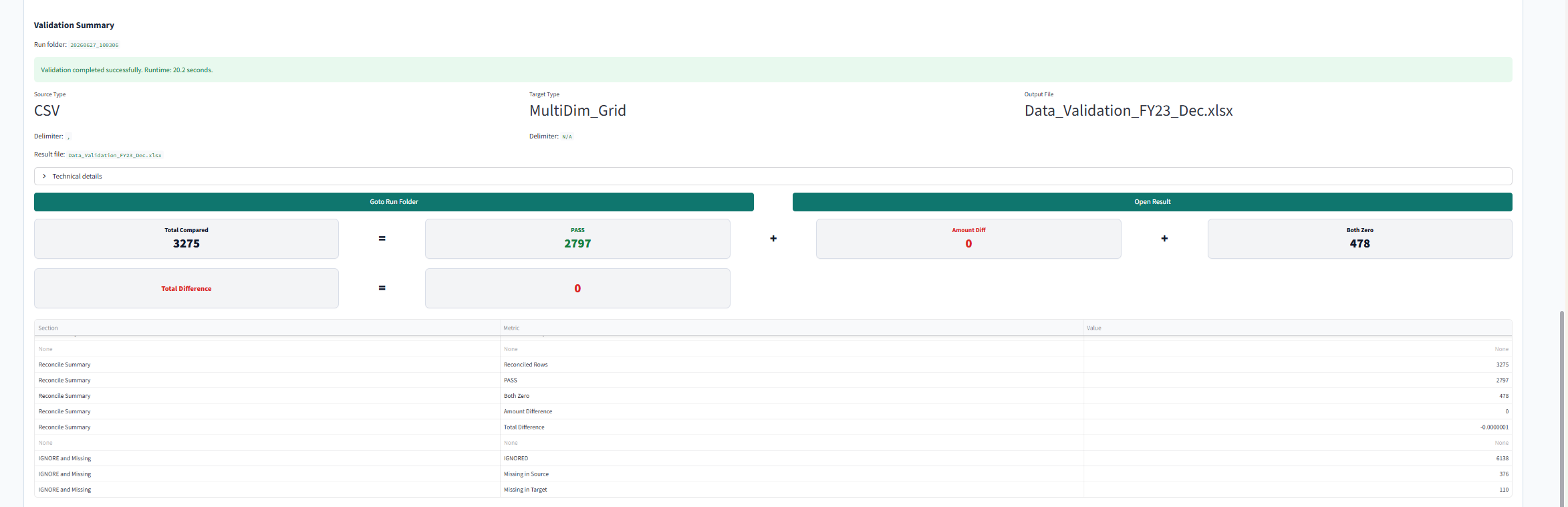
CSV-to-CSV, CSV-to-Grid, Grid-to-CSV, or Grid-to-Grid differences with drill-back to source and target Excel evidence.
Convertor
CSV and Excel grid files, layout choices, config, and run parameters.
Target-ready output files, summaries, and audit evidence that support repeatable conversion.
Data Readiness Check
CSV or grid artifacts checked against an Application Profile or metadata ZIP / XML.
Missing members, mapping edits, review suggestions, and downloadable readiness results.
Configure Wizard
Files, grids, templates, and Application Profile assisted mapping where available.
Validated config workbooks for CSV and grid modes instead of hand-authored setup files.
File-to-grid and grid-to-file review
Use one source and target path to prove whether a repeatable review approach will work.
Clearer evidence for delivery owners
Difference results, converted outputs, config workbooks, missing-member lists, and readiness folders.
Less late reconciliation pressure
Move from ad hoc spreadsheet checking to a review path that can be repeated and explained.
Where it helps
Use one path for validation, conversion, and readiness.
Source-to-target reconciliation
Compare CSV files and Smart View-style grids with a repeatable result table that keeps both evidence paths visible.
Load readiness before downstream review
Check files or grids against application and metadata context so missing members and mapping edits are visible earlier.
Conversion that can be explained
Prepare target-ready files while preserving summaries and outputs that reviewers can inspect after the run.
Reusable setup for recurring work
Generate and validate config workbooks so implementation and support teams do not recreate the same review logic by hand.
Inputs
Start from the data artifacts already in use.
Use source CSV files, Excel files, Smart View-style target grids, saved config workbooks, Application Profiles, or metadata ZIP / XML evidence. The point is not to ask the team to prepare a perfect demo dataset. The point is to make one real data path reviewable.
Outputs
Keep the review result useful after the meeting.
EPM Vitals produces difference tables, drill-back evidence, conversion summaries, downloadable readiness results, and validated config workbooks. Those outputs help reviewers explain what changed, where the source evidence sits, and what should be resolved before the next load or release decision.
Common EPM questions
Make file, grid, and readiness questions repeatable.
Can we compare source files to target EPM grids without rebuilding VLOOKUP workbooks?
Validation supports CSV-to-CSV, CSV-to-Grid, Grid-to-CSV, and Grid-to-Grid review paths with repeatable config workbooks and clear difference outputs.
Can this validate Smart View grids?
EPM Vitals can compare source files and exported Excel or Smart View-style grids when they are provided as files, while keeping drillable evidence for review.
Can reviewers click from a result back to both sides of the evidence?
Validation output can preserve drill-back to source and target Excel evidence, so reviewers can inspect the row, member, or value in context.
Can a load file be checked against application or metadata context before downstream issues appear?
Data Readiness Check reviews CSV or grid artifacts against an Application Profile or metadata ZIP / XML to surface missing members, mapping edits, and review suggestions.
Can we standardize conversion and validation setup for the next cycle?
Convertor and Configure Wizard help prepare target-ready data and validated config workbooks, reducing manual setup work across recurring delivery and support cycles.
Related confidence areas
Data review is clearer with application and metadata context.
Next step
Book a 20-minute EPM slice demo
Bring one file and one target grid to a demo.
Start with one validation or readiness question and see what evidence the review path produces.