
OneStream metadata exports, XML or package evidence, integration-node mapping context, initialized profiles, member properties, hierarchy exports, and aliases.
OneStream metadata mapping review
Review OneStream metadata and mapping evidence before handover.
EPM Vitals helps teams organize exported metadata, mapping rows, initialized profile evidence, and migration comparison findings into a review path people can revisit.
Related EPM search paths
Search terms around OneStream metadata, mappings, transformation logic, and handover review.
- #OneStream
- #OneStreamMetadata
- #MetadataMapping
- #AccountMapping
- #TransformationRules
- #DimensionManagement
- #IntegrationMapping
- #MigrationReadiness
- #MetadataReview
- #HandoverReview
Platform review path
Where this fits for OneStream metadata and mapping teams.
Use this path when metadata package evidence, mapping context, or profile comparison needs to be discussed before migration, remediation, or managed service handover.
What changed, which mapping context is affected, which findings need remediation, and what can be handed over with evidence attached?
Tagged comparison findings, mapping review exports, catalog health signals, profile comparison workbooks, and reusable handover records.
EPM Vitals organizes exported OneStream evidence for review; it does not replace OneStream deployment, governance, or migration ownership.
Where review breaks down
Where OneStream metadata and mapping review usually breaks down.
OneStream metadata and mapping review often becomes difficult when findings are scattered across package exports, mapping workbooks, profile setup notes, and migration issue lists. Reviewers may know that something changed, but still need a cleaner way to show what changed, where it sits, and why it matters before handover or remediation work continues.
Metadata changes need a shared review record.
Dimension members, hierarchy movement, aliases, properties, and package differences should be reviewable without turning every comparison into a manual spreadsheet exercise.
Mapping rows need delivery context.
Raw mapping rows, normalized review rows, integration node context, and changed items are easier to discuss when they stay close to the artifact that produced the finding.
Implementation findings should survive the project phase.
EPM Vitals helps implementation firms and client-side EPM owners keep metadata review, mapping review, and migration findings in a reusable handover path.
Artifacts reviewed
Artifacts to compare before handover.
A OneStream metadata review usually needs more than a list of changed members. The team may need to inspect metadata packages, mapping relationships, profile initialization output, dimension members, member properties, aliases, hierarchy exports, and migration findings in the same review conversation.
Artifact
What reviewers need to inspect
Why it matters
Metadata packages
Dimension members, hierarchy changes, aliases, properties, package coverage, and compare findings.
Structural drift becomes expensive when it is discovered after loads, reporting, or handover.
Mapping relationships
Integration-node context, raw rows, normalized mapping rows, changed mappings, and review exports.
Mapping issues often explain why downstream data validation or migration readiness questions appear.
Initialized profiles
Profile setup evidence, package comparison output, review queues, and tagged findings.
Reusable profile evidence gives the next owner a clearer starting point than screenshots and notes.
Mapping questions
Mapping questions implementation teams need to answer.
Which metadata or mapping change matters for this release?
Use tagged findings and comparison outputs to separate expected structural change from issues that need remediation before handover.
Can mappings be reviewed by the context the team actually uses?
Keep mapping review tied to integration node or location context so implementation and operations teams can discuss the same slice of evidence.
Can a client-side owner revisit the finding later?
Package evidence, mapping exports, review queues, and workbooks make it easier to revisit what was found after the project team has moved on.
Does a mapping issue connect to data validation or application impact?
When a mapping finding explains a downstream variance or readiness issue, the review should stay connected to data and application evidence.
Review coverage
How EPM Vitals organizes review evidence.
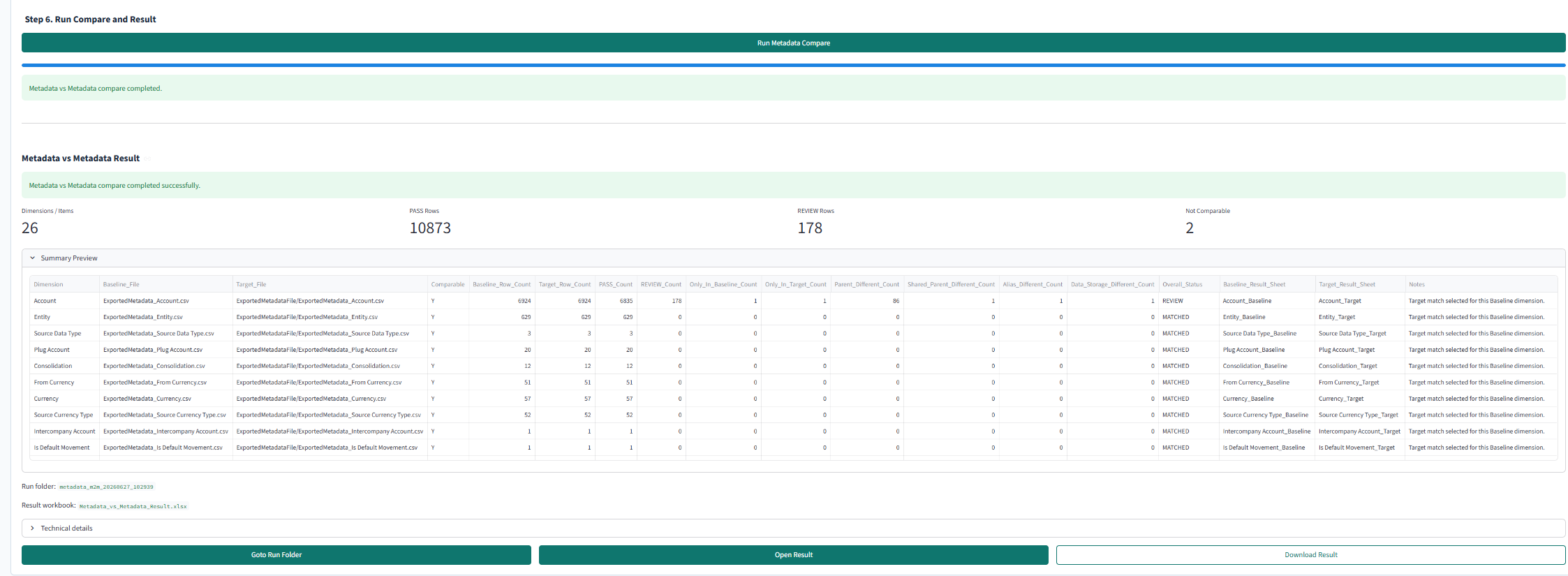
EPM Vitals helps teams organize exported OneStream evidence into visible review paths. Metadata packages can be compared, mapping relationships can be inspected, migration findings can be tagged, and handover workbooks can stay close to the artifacts that produced them.
Compare package or profile evidence before structure becomes downstream risk.
Review hierarchy, member property, alias, and package findings in a form the team can discuss.
Review mappings by the context your delivery team uses.
Keep raw rows, normalized review rows, and current-review exports together for follow-up.
Turn migration findings into reusable records.
Use tagged findings, catalog signals, and downloadable workbooks instead of scattered screenshots.
Boundaries
Boundaries for OneStream teams.
This page is intentionally focused on metadata, mapping, package comparison, profile initialization, and migration evidence. EPM Vitals is not a OneStream platform replacement, not an automatic remapping engine, and not a substitute for OneStream governance or delivery ownership.
Related EPM Vitals paths
Metadata and mapping review often connects back to data and application impact.
FAQ
OneStream metadata and mapping review questions.
Can EPM Vitals review OneStream metadata and mappings?
EPM Vitals can organize exported OneStream metadata, mapping, and initialized profile evidence for review where those artifacts are provided. It does not replace OneStream deployment or platform governance.
What does the mapping review help teams discuss?
Mapping review helps teams discuss integration node context, raw mapping rows, normalized review rows, changed items, and handover findings before migration or managed service work depends on them.
Is this for implementation firms or client-side EPM owners?
Both. Implementation firms can use it to prepare clearer handover evidence, while client-side EPM owners can use it to review package, mapping, and migration findings before ownership moves forward.
Does EPM Vitals automatically rebuild OneStream mappings?
No. EPM Vitals focuses on organizing exported metadata, mapping, and profile evidence for review. It does not automatically redesign or redeploy OneStream mappings.
Next step
Book a 20-minute EPM slice demo
Bring one metadata or mapping review question to a demo.
Start with one export, one initialized profile, one mapping context, or one migration comparison.